
Instant SOCD backdash on a leverless controller
Hold Back and tap Forward. You keep blocking while the backdash comes out.
Instant SOCD backdash on a leverless controller
Hold Back and tap Forward. You keep blocking while the backdash comes out.
- Press Back.
- Press Back + Forward. The game reads neutral.
- Press Back.
Watch it slowed down, then press Try it and do it yourself with a controller or your keyboard (A, S, D and Space, or the arrow keys). Timing is not frame-accurate. The animation shows the order of presses; check exact timing in your game's training mode. The animation assumes the Capcom/Neutral SOCD mode (Left + Right = Neutral, Up + Down = Neutral), which is how the MICRO and SWORL ship. Game and character names belong to their owners.
Pro notes: Instant SOCD backdash
Notation 4, 4+6, 4. Directions are written for a character facing right.
Keys you press vs what the game reads
Top row: the buttons you hold. Bottom row: the direction the game receives in Capcom/Neutral mode. Highlighted steps are where opposing directions cancel to neutral.
SOCD modes
| Up priority (Classic)L + R = Neutral, U + D = Up | Capcom/NeutralL + R = Neutral, U + D = Neutral. Shipping mode. | Last priority (2iP)Newest direction wins | NoneBoth sent; the game decides |
|---|---|---|---|
| Works | Works | Different result | Different result |
Set the mode by holding a direction while you plug in: Up = Capcom/Neutral, Left = Up priority, Down = Last priority, Right = None. Check yours in the controller tester.
Frame and timing notes
- Keys you press: 4, 4+6, 4. What the game reads: 4, 5, 4, a backdash while Back stays held so you keep blocking.
- Works in Capcom/Neutral and Up priority (Classic). In Last priority the tap reads as Forward and in None both directions are sent.
- This is Wavu's SOCD keyboard method for the backdash cancel: hold b, tap f for the neutral.
Sources
Leverless tips for the Instant SOCD backdash
The finger map used here: ring finger on Back, middle finger on Down, index finger on Forward, right thumb on Up.
- Hold Back so you keep blocking, then tap Forward once to make the neutral gap.
- Keep the Forward tap short and keep Back held the whole time.
More techniques
-
Crouching dragon punchIntermediate
Hold Down the whole time and tap Forward twice. An anti-air straight from a crouch.
-
Double-tap dashBeginner
Two fingers on one button: slide the middle finger through Forward, then the index finger.
-
Down, downBeginner
Two fingers on the Down button, one after the other, with the attack on the second. Orie's Sealing Hoplon (22A/B/C) is the example.
-
Dragon punch (no diagonals)Beginner
Forward, Down, Forward, punch. Street Fighter 6 accepts it with no diagonal at all.
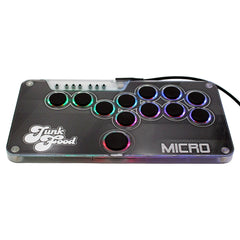
Half an inch thick, 12 hot-swappable buttons and your art under the lid. From $89 for Switch 1 & 2 and PC, with a PS5 & Xbox upgrade.