
Move Lab: fighting game moves on a leverless controller
Every input here is animated button by button on a real leverless layout, then broken into steps and tips you can practice. Watch it, then switch to Try it and do it yourself with your controller or keyboard.
- 56inputs
- 9games
- 3difficulty levels
Timing is not frame-accurate. The animations show the order of presses; check exact timing in your game's training mode. The animations assume the Capcom/Neutral SOCD mode (Left + Right = Neutral, Up + Down = Neutral), which is how the MICRO and SWORL ship. Game and character names belong to their owners.
How leverless inputs work
On a leverless controller every direction is a button. Once you know which finger does what, every move on this page is just a short sequence of presses.
The finger map
Left hand: ring finger on Back, middle finger on Down, index finger on Forward. Right thumb on Up. A quarter-circle becomes a two-finger roll.
Numpad notation
Players write directions as numbers on a keypad, facing right: 2 is down, 6 is forward, 3 is down-forward, 5 is neutral. So 236 is a quarter-circle forward.
SOCD, in one line
Hold Back and Forward together and the controller sends neutral. That one rule powers dashes, backdashes and shortcuts. See how it works or watch it happen in the controller tester.
Start here: five inputs to learn first
Learn these in order. Between them they cover the motions behind most special moves in every game here.
- Quarter-circle forward Two fingers, three game inputs: press Down, add Forward, let go of Down. The...
- Dragon punch motion Forward, Down, then add Forward again. A zigzag of three presses that powers every...
- Charge back, forward Hold Back with one finger, then tap Forward with another. Keep them clean: Back...
- Half-circle forward One roll across all three left-hand buttons, from Back to Forward. Used for command...
- SOCD: Back + Forward = neutral Hold both horizontal directions and the controller sends neutral. That is how the MICRO...
Every move in the Move Lab
Famous moves
Signature specials from Street Fighter, Tekken, Mortal Kombat and more, broken down into the exact presses on a leverless controller.
-
Ball BusterBeginner
The nut punch. Tap back, then down with Front Punch. He drops into the splits and punches up.
-
Dragon’s TailBeginner
His flying kick. Tap back, then forward with Front Kick. He sails across the stage foot-first.
-
Electric FlyBeginner
Tap back, then forward with Front Kick. He flies across the stage head-first.
-
Electric Wind God FistAdvanced
Forward, release to neutral, down, then down-forward and 2 on the same frame.
-
Evo Moment 37Advanced
Evo 2004. Daigo taps forward to parry all 15 hits of Chun-Li’s super, the last one in mid-air, then punishes for the win. A historic sequence to watch and understand, not a practice drill; the arrows are a summary.
-
Flame-PortBeginner
Tap down, then back with Front Kick. He vanishes and reappears behind the opponent.
-
Giant SwingIntermediate
Forward, then a half-circle from back to forward, with 1 at the end. Six presses rolled across three fingers.
-
HadokenBeginner
Quarter-circle forward, then punch. On leverless it is a finger roll: down, add right, let go of down.
-
Hell SweepIntermediate
The Electric motion with 4 instead of 2, then 1 for the left hook. Its full name is Spinning Demon to Left Hook.
-
Ice BallBeginner
Tap down, then forward with Front Punch. A hit freezes the opponent in place.
-
Ice SlideBeginner
Tap back, then forward with Front Kick. He slides in low and takes the legs out.
-
Phoenix SmasherBeginner
Quarter-circle forward and 2. Players call it the Deathfist. Same motion as a Hadoken.
-
Rolling AttackBeginner
Hold back to charge, then forward with punch. Same input as Sonic Boom.
-
Screw PiledriverIntermediate
A full circle is four buttons: back, down, forward, then Up with punch.
-
ShoryukenIntermediate
Forward, down, then down-forward with punch. On leverless that is index, middle, then index finger again, with Down still held for the last press.
-
Somersault KickBeginner
Hold down to charge, then hit Up with your thumb and kick together.
-
Sonic BoomBeginner
Hold back to charge, then press forward with punch. On leverless your ring finger holds Back and your index finger taps Forward.
-
SpearBeginner
Tap back, then forward with Front Punch. Two quick taps on leverless.
-
Spinning Bird KickBeginner
Hold down to charge, then Up with kick. Same input as the Somersault Kick.
-
Spiral ArrowBeginner
Quarter-circle forward, then kick. The Hadoken motion with a kick instead of a punch.
-
Tatsumaki Senpu-kyakuBeginner
Quarter-circle back, then kick. The mirror of the Hadoken roll: down, add left, let go of down.
-
Web SwingBeginner
Quarter-circle back, then kick. He swings in on a web line, feet first.
Motions
The building blocks. Learn these once and most special moves in any game follow.
-
360Intermediate
Four cardinal presses ending on Up. No diagonals needed, which makes command grabs far easier on leverless than on a stick.
-
Back, ForwardBeginner
Two separate taps, not a roll. Most Mortal Kombat specials are tap, tap, button.
-
Charge back, forwardBeginner
Hold Back with one finger, then tap Forward with another. Keep them clean: Back + Forward together is neutral.
-
Charge down, upBeginner
Hold Down with the left hand, then tap Up with the right thumb. The charge motion behind flash kicks and Spinning Bird Kicks.
-
Crouch dashIntermediate
Forward, let go, Down, add Forward. The Mishima crouch dash behind the Electric and the Hell Sweep.
-
Double quarter-circleIntermediate
Two quarter-circles back to back. The input for most supers, done as two quick finger rolls on leverless.
-
Dragon punch motionIntermediate
Forward, Down, then add Forward again. A zigzag of three presses that powers every Shoryuken-style uppercut.
-
Half-circle backIntermediate
The half-circle the other way, from Forward to Back: index, middle, then ring finger in one roll.
-
Half-circle forwardIntermediate
One roll across all three left-hand buttons, from Back to Forward. Used for command grabs and many supers.
-
Quarter-circle backBeginner
The same roll the other way: Down, add Back, let go of Down. The motion behind Tatsumaki kicks and many command moves.
-
Quarter-circle forwardBeginner
Two fingers, three game inputs: press Down, add Forward, let go of Down. The base of most fireballs.
Techniques
Leverless and SOCD tricks: dashes, backdashes and shortcuts that are easier on buttons than on a stick.
-
Crouching dragon punchIntermediate
Hold Down the whole time and tap Forward twice. An anti-air straight from a crouch.
-
Double-tap dashBeginner
Two fingers on one button: slide the middle finger through Forward, then the index finger.
-
Down, downBeginner
Two fingers on the Down button, one after the other, with the attack on the second. Orie's Sealing Hoplon (22A/B/C) is the example.
-
Dragon punch (no diagonals)Beginner
Forward, Down, Forward, punch. Street Fighter 6 accepts it with no diagonal at all.
-
Dragon punch (SOCD method)Intermediate
Hold Forward, press Back and Down together (it reads as Down), then let go of Back and punch.
-
Half-circle back, forwardIntermediate
Forward round to Back, then Forward again. Make a clean switch from Back to Forward at the end.
-
Half-circle (SOCD method)Intermediate
Press all three for a moment in the middle. Back + Down + Forward reads as Down, so the Down input cannot be skipped.
-
Hyper hopIntermediate
Hold Forward. Tap Down, then tap Up right after it and let go fast. Down must be released before Up lands.
-
Instant SOCD backdashIntermediate
Hold Back and tap Forward. You keep blocking while the backdash comes out.
-
Instant SOCD dashIntermediate
Hold Forward and tap Back. Back + Forward reads as neutral, so the game sees Forward, neutral, Forward.
-
Instant While RunningIntermediate
Tap Forward three times, letting go between taps, then press the attack one frame after the third tap while Forward is still held. The example uses 2+4.
-
Korean Backdash (jump cancel)Advanced
Keep Back held. Tap Up with the thumb, then tap Forward. Fails on characters who backflip on Up-Back.
-
Korean Backdash (SOCD)Advanced
Keep Back held the whole time. Tap Down, then tap Forward, one at a time, never together.
-
Korean Backdash (standard)Advanced
Tap Back, let go, roll Down-Back to Back, let go. Each loop cancels one backdash into the next.
-
Slide 360Intermediate
Slide one finger across Forward, Down, Back, then press Up + punch with the right hand.
-
Slide 720Advanced
Slide Forward, Down, Back; tap Up; slide Back, Down, Forward; punch. Tap Up fast or you will jump.
-
SOCD: Back + Forward = neutralBeginner
Hold both horizontal directions and the controller sends neutral. That is how the MICRO and SWORL come set up, and this one rule powers most leverless tricks.
-
SOCD: Up + Down = neutralBeginner
Hold Down and press Up and the controller sends neutral; let go of Down and the Up comes through at once. That is how the MICRO and SWORL come set up.
-
Sonic Boom from crouch blockIntermediate
Charge on Down-Back so you block low the whole time, then let go and press Forward + punch.
-
Tiger knee motionIntermediate
A quarter-circle that ends on Up-Forward, with the attack pressed right after Up so the move comes out as you leave the ground.
-
Walking dragon punchIntermediate
Hold Forward, tap Down, and punch as you let go. An uppercut without ever stopping your walk.
-
Walking super shortcutIntermediate
Hold Forward, tap Back + Down twice, then attack. Documented for Street Fighter V, so check it in your game.
-
WavedashAdvanced
A crouch dash cancelled straight into another. Forward, let go, Down, add Forward, then back to Forward.
No moves match. Try another game or clear the search.
Questions about leverless inputs
What is a leverless controller?
A fight stick with buttons instead of a joystick. Your left hand presses Left, Down and Right, and your right thumb presses Up, so every direction is a single button press. Read the full explainer.
Are motion inputs harder on leverless?
They are different. A quarter-circle becomes a two-finger roll, a dragon punch becomes three presses and a 360 becomes four separate buttons. Expect an adjustment period, then motions come out the same way every time.
What does 236 mean?
It is numpad notation. Picture a number pad with your character facing right: 2 is down, 3 is down-forward and 6 is forward, so 236 is a quarter-circle forward. 5 is neutral, with no direction held.
What is SOCD?
Simultaneous opposing cardinal directions: what the controller sends when you hold Left and Right, or Up and Down, at the same time. Out of the box the Snack Box MICRO and SWORL send neutral for both, which is the setting tournaments such as the Capcom Pro Tour require. The techniques section shows what that rule lets you do. The four selectable modes are Up priority (Classic), Capcom/Neutral (the shipping mode), Last priority (2iP) and None; Pro mode shows which modes each technique works in.
What does Pro mode add?
Switch the toggle at the top of any page to Pro for a two-lane input strip (the keys you press versus what the game reads), a table of which SOCD modes each technique works in, frame notes with sources and exact notation. Beginner mode is the default and keeps to the steps and tips.
Can I practice without a leverless controller?
Yes. Every move page has a Try it mode that works with your keyboard (A, S, D and Space, or the arrow keys) or any controller plugged into your computer.
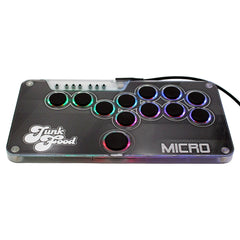
Half an inch thick, 12 hot-swappable buttons and your art under the lid. From $89 for Switch 1 & 2 and PC, with a PS5 & Xbox upgrade.