
Crouching dragon punch on a leverless controller
Hold Down the whole time and tap Forward twice. An anti-air straight from a crouch.
Crouching dragon punch on a leverless controller
Hold Down the whole time and tap Forward twice. An anti-air straight from a crouch.
- Press Down + Forward.
- Press Down.
- Press Down + Forward with Square (Punch).
Watch it slowed down, then press Try it and do it yourself with a controller or your keyboard (A, S, D and Space, or the arrow keys). Timing is not frame-accurate. The animation shows the order of presses; check exact timing in your game's training mode. The animation assumes the Capcom/Neutral SOCD mode (Left + Right = Neutral, Up + Down = Neutral), which is how the MICRO and SWORL ship. Game and character names belong to their owners.
Pro notes: Crouching dragon punch
Notation 323 + P. Directions are written for a character facing right.
Keys you press vs what the game reads
Top row: the buttons you hold. Bottom row: the direction the game receives. No opposing directions are held together in this input, so every SOCD mode reads it the same way; diagonals are two keys read as one direction.
Frame and timing notes
No frame data is claimed for this entry. Use your game's training mode with the input display on to confirm the window.
Leverless tips for the Crouching dragon punch
The finger map used here: ring finger on Back, middle finger on Down, index finger on Forward, right thumb on Up.
- Keep Down held with your middle finger the whole time and tap Forward twice with your index finger.
- You stay crouching right up to the uppercut, so it comes straight out of a low stance.
Related moves
-
Dragon punch motionIntermediate
Forward, Down, then add Forward again. A zigzag of three presses that powers every Shoryuken-style uppercut.
-
ShoryukenIntermediate
Forward, down, then down-forward with punch. On leverless that is index, middle, then index finger again, with Down still held for the last press.
-
Dragon punch (SOCD method)Intermediate
Hold Forward, press Back and Down together (it reads as Down), then let go of Back and punch.
-
Dragon punch (no diagonals)Beginner
Forward, Down, Forward, punch. Street Fighter 6 accepts it with no diagonal at all.
More from Street Fighter 6
-
HadokenBeginner
Quarter-circle forward, then punch. On leverless it is a finger roll: down, add right, let go of down.
-
Rolling AttackBeginner
Hold back to charge, then forward with punch. Same input as Sonic Boom.
-
Screw PiledriverIntermediate
A full circle is four buttons: back, down, forward, then Up with punch.
-
Slide 360Intermediate
Slide one finger across Forward, Down, Back, then press Up + punch with the right hand.
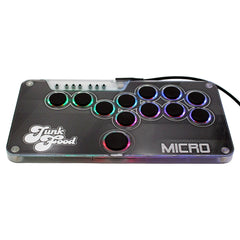
Half an inch thick, 12 hot-swappable buttons and your art under the lid. From $89 for Switch 1 & 2 and PC, with a PS5 & Xbox upgrade.