
How to do the Giant Swing on a leverless controller
Forward, then a half-circle from back to forward, with 1 at the end. Six presses rolled across three fingers.
How to do the Giant Swing on a leverless controller
Forward, then a half-circle from back to forward, with 1 at the end. Six presses rolled across three fingers.
- Press Forward.
- Press Back.
- Press Down + Back.
- Press Down.
- Press Down + Forward.
- Press Forward with Square (1).
Watch it slowed down, then press Try it and do it yourself with a controller or your keyboard (A, S, D and Space, or the arrow keys). Timing is not frame-accurate. The animation shows the order of presses; check exact timing in your game's training mode. The animation assumes the Capcom/Neutral SOCD mode (Left + Right = Neutral, Up + Down = Neutral), which is how the MICRO and SWORL ship. Game and character names belong to their owners.
Pro notes: Giant Swing
Notation f, hcf + 1. Directions are written for a character facing right.
Keys you press vs what the game reads
Top row: the buttons you hold. Bottom row: the direction the game receives. No opposing directions are held together in this input, so every SOCD mode reads it the same way; diagonals are two keys read as one direction.
Frame and timing notes
- Wavu: Giant Swing is f,hcf+1, i10, 45 damage. Only f, b, d, f are required for the normal throw; the diagonals can be skipped.
- Blue spark (50 damage, i11 with a buffered input): input every direction of the half-circle, with d/f held for 1 to 3 frames, f for 0 to 1 frame, then f+1. On leverless that means the last Down-Forward and Forward are very short taps before the 1; use the input display to check.
Sources
Leverless tips for the Giant Swing
The finger map used here: ring finger on Back, middle finger on Down, index finger on Forward, right thumb on Up.
- Your ring, middle and index fingers each cover one direction, so the half-circle is one roll across the three buttons.
- Tap Forward first, then start the half-circle from Back. Press 1 as Forward lands at the end.
Related moves
More from Tekken 8
-
Crouch dashIntermediate
Forward, let go, Down, add Forward. The Mishima crouch dash behind the Electric and the Hell Sweep.
-
Electric Wind God FistAdvanced
Forward, release to neutral, down, then down-forward and 2 on the same frame.
-
Hell SweepIntermediate
The Electric motion with 4 instead of 2, then 1 for the left hook. Its full name is Spinning Demon to Left Hook.
-
Instant While RunningIntermediate
Tap Forward three times, letting go between taps, then press the attack one frame after the third tap while Forward is still held. The example uses 2+4.
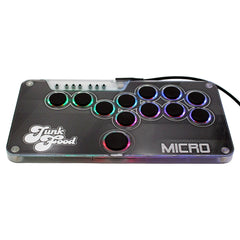
Half an inch thick, 12 hot-swappable buttons and your art under the lid. From $89 for Switch 1 & 2 and PC, with a PS5 & Xbox upgrade.