
Slide 720 on a leverless controller
Slide Forward, Down, Back; tap Up; slide Back, Down, Forward; punch. Tap Up fast or you will jump.
Slide 720 on a leverless controller
Slide Forward, Down, Back; tap Up; slide Back, Down, Forward; punch. Tap Up fast or you will jump.
- Press Forward.
- Press Down.
- Press Back.
- Press Up.
- Press Back.
- Press Down.
- Press Forward with Square (Punch).
Watch it slowed down, then press Try it and do it yourself with a controller or your keyboard (A, S, D and Space, or the arrow keys). Timing is not frame-accurate. The animation shows the order of presses; check exact timing in your game's training mode. The animation assumes the Capcom/Neutral SOCD mode (Left + Right = Neutral, Up + Down = Neutral), which is how the MICRO and SWORL ship. Game and character names belong to their owners.
Pro notes: Slide 720
Notation 6, 2, 4, 8, 4, 2, 6 + P. Directions are written for a character facing right.
Keys you press vs what the game reads
Top row: the buttons you hold. Bottom row: the direction the game receives. No opposing directions are held together in this input, so every SOCD mode reads it the same way; diagonals are two keys read as one direction.
Frame and timing notes
- Seven cardinal inputs, no diagonals: 6, 2, 4, 8, 4, 2, 6 with the punch on the last Forward. Tap Up and release at once or the character jumps.
- Buffer the motion during another move or a jump so the Up never leaves the ground. Verify in SF6 training mode with Zangief's SA3 input history.
Leverless tips for the Slide 720
The finger map used here: ring finger on Back, middle finger on Down, index finger on Forward, right thumb on Up.
- Two sweeps across the left-hand buttons with a quick Up tap in between.
- Tap Up and let go at once. Holding it makes the character jump before the motion finishes.
Related moves
-
360Intermediate
Four cardinal presses ending on Up. No diagonals needed, which makes command grabs far easier on leverless than on a stick.
-
Screw PiledriverIntermediate
A full circle is four buttons: back, down, forward, then Up with punch.
-
Slide 360Intermediate
Slide one finger across Forward, Down, Back, then press Up + punch with the right hand.
More from Street Fighter 6
-
Crouching dragon punchIntermediate
Hold Down the whole time and tap Forward twice. An anti-air straight from a crouch.
-
Dragon punch (no diagonals)Beginner
Forward, Down, Forward, punch. Street Fighter 6 accepts it with no diagonal at all.
-
Dragon punch (SOCD method)Intermediate
Hold Forward, press Back and Down together (it reads as Down), then let go of Back and punch.
-
HadokenBeginner
Quarter-circle forward, then punch. On leverless it is a finger roll: down, add right, let go of down.
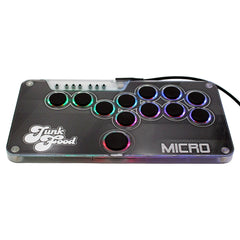
Half an inch thick, 12 hot-swappable buttons and your art under the lid. From $89 for Switch 1 & 2 and PC, with a PS5 & Xbox upgrade.