
Wavedash on a leverless controller
A crouch dash cancelled straight into another. Forward, let go, Down, add Forward, then back to Forward.
Wavedash on a leverless controller
A crouch dash cancelled straight into another. Forward, let go, Down, add Forward, then back to Forward.
- Press Forward.
- Let go of every direction (neutral).
- Press Down.
- Press Down + Forward.
- Press Forward.
- Let go of every direction (neutral).
- Press Down.
- Press Down + Forward.
Watch it slowed down, then press Try it and do it yourself with a controller or your keyboard (A, S, D and Space, or the arrow keys). Timing is not frame-accurate. The animation shows the order of presses; check exact timing in your game's training mode. The animation assumes the Capcom/Neutral SOCD mode (Left + Right = Neutral, Up + Down = Neutral), which is how the MICRO and SWORL ship. Game and character names belong to their owners.
Pro notes: Wavedash
Notation f, n, d, d/f, f, n, d, d/f. Directions are written for a character facing right.
Keys you press vs what the game reads
Top row: the buttons you hold. Bottom row: the direction the game receives. No opposing directions are held together in this input, so every SOCD mode reads it the same way; diagonals are two keys read as one direction.
Frame and timing notes
- Wavu: f,n,d,d/f then f. The Forward after the crouch dash cancels it into a regular dash and is already the first f of the next crouch dash, so the input history reads f,n,qcf,n,f,n,qcf.
- Return to neutral between loops. On leverless the neutral is a full finger lift, which is easier than centring a stick.
- Wave guard: press Back quickly after the crouch dash input to cancel into block.
Sources
Leverless tips for the Wavedash
The finger map used here: ring finger on Back, middle finger on Down, index finger on Forward, right thumb on Up.
- Each loop is a crouch dash: Forward, neutral, Down, Down-Forward. Go back to Forward to start the next one.
- Keep the neutral step. Skip it and the loop turns into a walk.
Related moves
-
Crouch dashIntermediate
Forward, let go, Down, add Forward. The Mishima crouch dash behind the Electric and the Hell Sweep.
-
Electric Wind God FistAdvanced
Forward, release to neutral, down, then down-forward and 2 on the same frame.
-
Hell SweepIntermediate
The Electric motion with 4 instead of 2, then 1 for the left hook. Its full name is Spinning Demon to Left Hook.
More from Tekken 8
-
Giant SwingIntermediate
Forward, then a half-circle from back to forward, with 1 at the end. Six presses rolled across three fingers.
-
Instant While RunningIntermediate
Tap Forward three times, letting go between taps, then press the attack one frame after the third tap while Forward is still held. The example uses 2+4.
-
Korean Backdash (jump cancel)Advanced
Keep Back held. Tap Up with the thumb, then tap Forward. Fails on characters who backflip on Up-Back.
-
Korean Backdash (SOCD)Advanced
Keep Back held the whole time. Tap Down, then tap Forward, one at a time, never together.
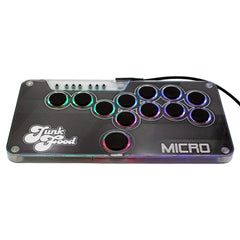
Half an inch thick, 12 hot-swappable buttons and your art under the lid. From $109 for Switch 1 & 2 and PC, with a PS5 & Xbox upgrade.
Practice on a leverless controller
Every input in the Move Lab works on these controllers.
 Snack Box MICRO
 MICRO XL
 SLIDER